
ComfyUITemplates.com
Discover free ready-made ComfyUI templates for AI workflows.
Flux with DyPE for Native 4K+ Image Generation
Flux with DyPE is a ComfyUI workflow for native 4K+ image generation using FLUX models. It patches the UNet directly via the DyPE node for artifact-free, high-resolution outputs without traditional upscaling. This ComfyUI workflow utilizes the DyPE node to **generate artifact-free, high-resolution images natively**, specifically designed for FLUX models. It allows for the creation of crisp 4K and higher resolution outputs by directly patching the UNet, ensuring superior quality. **What makes Flux with DyPE special** - **Native 4K+ output**: Achieve resolutions of 4K and beyond without relying on traditional upscaling methods. - **Optimized for FLUX models**: Engineered to work seamlessly with FLUX models, enhancing their generation capabilities. - **Direct UNet patching**: DyPE directly patches the UNet for improved image fidelity and stability at high resolutions. - **Dynamic positioning control**: The `enable_dype` toggle offers advanced control over element placement and composition within the high-resolution canvas. **How it works** - **DyPE node integration**: The core DyPE node is integrated into your workflow, managing the high-resolution generation process. - **Parameter tuning**: Fine-tune the `dype_exponent` (2.0 is ideal for 4K+) and select a `method` (yarn recommended) to guide the generation. - **Seamless KSampler connection**: The DyPE node's `MODEL` output directly feeds into your `KSampler` node for integrated high-resolution inference. **Quick start in ComfyUI** - **Set matching resolutions**: Adjust the `width` and `height` parameters on the DyPE node to correspond with the resolution in your `Empty Latent Image` node. - **Configure DyPE parameters**: Select your preferred `method` (yarn is a good starting point), enable or disable `dynamic positioning` using the `enable_dype` toggle, and set `dype_exponent` to 2.0 for 4K output. - **Connect and generate**: Connect the `MODEL` output from the DyPE node to your `KSampler` node's input, then start your workflow. **Recommended settings** - **DyPE exponent**: A value of 2.0 is recommended for robust 4K and higher resolution outputs. - **Generation method**: The 'yarn' method often yields optimal results for high-resolution image generation. - **Initial resolution guidelines**: Keep `width` and `height` parameters below 1024x1024 unless you are using the most current, bug-fixed version of DyPE. **Pro tips** - **Experiment with values**: Adjust `dype_exponent` and `method` to find the best quality for your specific resolution targets and image content. - **FLUX model focus**: Remember that DyPE is specifically designed for FLUX models and only patches the UNet, ensuring focused enhancement. **Why use this workflow** - **Superior image quality**: Generate stunning, artifact-free images at native high resolutions. - **Efficient high-res output**: Streamline your workflow for 4K+ outputs without complex post-processing steps. - **Dedicated FLUX enhancement**: Leverage a tool specifically built to maximize the potential of FLUX models for detailed imagery. **Conclusion** The Flux with DyPE workflow enables ComfyUI users to achieve **native 4K+ image generation** with FLUX models, providing artifact-free, high-fidelity outputs through direct UNet patching and configurable parameters.
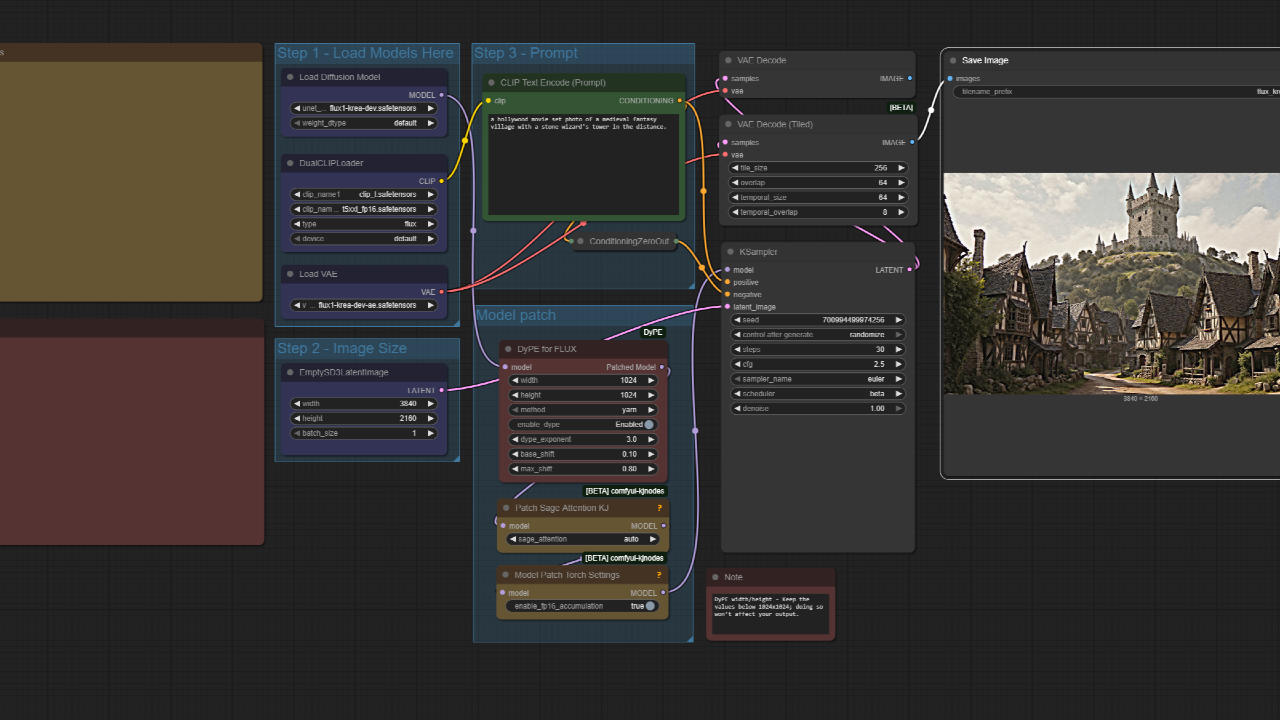
ComfyUI Workflow: Flux with DyPE for Native 4K+ Image Generation
This ComfyUI workflow utilizes the DyPE node to generate artifact-free, high-resolution images natively, specifically designed for FLUX models. It allows for the creation of crisp 4K and higher resolution outputs by directly patching the UNet, ensuring superior quality without relying on traditional upscaling methods.
What Makes Flux with DyPE Special
- Native 4K+ output: Achieve resolutions of 4K and beyond without traditional upscaling.
- Optimized for FLUX models: Engineered to work seamlessly with FLUX models, enhancing their generation capabilities.
- Direct UNet patching: DyPE directly patches the UNet for improved image fidelity and stability at high resolutions.
- Dynamic positioning control: The
enable_dypetoggle offers advanced control over element placement and composition within the high-resolution canvas.
How It Works
- DyPE node integration: The core DyPE node manages the high-resolution generation process within the workflow.
- Parameter tuning: Fine-tune the
dype_exponent(2.0 is ideal for 4K+) and select amethod(yarn recommended) to guide generation. - Seamless KSampler connection: The DyPE node's MODEL output feeds directly into your KSampler node for integrated high-resolution inference.
Quick Start in ComfyUI
- Set matching resolutions: Adjust the
widthandheightparameters on the DyPE node to match your Empty Latent Image node. - Configure DyPE parameters: Select your preferred
method(yarn is a good starting point), enable or disable dynamic positioning using theenable_dypetoggle, and setdype_exponentto 2.0 for 4K output. - Connect and generate: Connect the MODEL output from the DyPE node to your KSampler node's input, then run the workflow.
Recommended Settings
- DyPE exponent: A value of 2.0 is recommended for robust 4K and higher resolution outputs.
- Generation method: The
yarnmethod often yields optimal results for high-resolution image generation. - Initial resolution guidelines: Keep
widthandheightparameters below 1024x1024 unless you are using the latest bug-fixed version of DyPE.
Pro Tips
- Experiment with values: Adjust
dype_exponentandmethodto find the best quality for your specific resolution targets and image content. - FLUX model focus: DyPE is specifically designed for FLUX models and only patches the UNet, ensuring focused enhancement without affecting other model components.
Why Use This Workflow
- Superior image quality: Generate stunning, artifact-free images at native high resolutions.
- Efficient high-res output: Streamline your process for 4K+ outputs without complex post-processing.
- Dedicated FLUX enhancement: Leverage a tool specifically built to maximize the potential of FLUX models for detailed, large-format imagery.
Use Cases
- Generating native 4K product images and concept art
- Creating high-resolution character illustrations or scene compositions
- Any FLUX-based workflow requiring large-format, artifact-free image output


